Hoobuy buying guide
Follow the order from a product you like to a parcel you can receive. Start at the stage you are on.
- Find and choose the itemOriginal links, variants, measurements and seller checks.
- Place and pay for the purchaseThe agent’s role, order messages and the first payment.
- Check QC and resolve a returnInspect the received item before it joins a parcel.
- Plan international shippingFees, weight, packaging and route choices. Check item restrictions.
- Track and receive the parcelFollow handovers and prepare a useful support request.
Help Center has the calculator, common questions and help by order stage.
Hoobuy video guide
See the buying process in Hoobuy’s own tutorial, then use the illustrated order steps below.
Open Hoobuy’s video guideThe tutorial opens on Hoobuy.

What is Hoobuy?
Hoobuy is a shopping agent between you and a Chinese seller. You specify the product; Hoobuy purchases it, receives it at the warehouse, provides photos and arranges the international shipment you choose.
The seller is responsible for supplying the item. Hoobuy handles purchase and warehouse requests; the selected carrier moves the parcel. You review the received item and choose whether to accept it, seek a return or ship it.
Why choose Hoobuy?
Most shopping agents connect a purchase, warehouse check and international parcel. Hoobuy’s actual workflow lets you start with the original product URL, review imported options, follow order messages and inspect warehouse photos before parcel submission. Its estimator asks for destination, item category, weight and dimensions.
That can suit an overseas shopper who has found a bag but needs an agent to purchase it and check that the correct size and strap arrived. Confirm the required photo or measurement and a suitable destination route before paying.
If no route accepts the item, use a different service that confirms it can handle the request, or choose another product. If the seller has suitable direct international delivery and returns, compare that checkout too. An extra warehouse stage is useful when it solves a real inspection or consolidation need.
Understand the estimator fields Compare the required serviceHow to use Hoobuy
- Paste the seller URL, select the correct option and quantity, and add any precise purchase request.
- Pay for the goods, domestic delivery and charges shown at purchase.
- Read order messages while the item is bought and sent to the warehouse.
- Review QC; ask for a missing measurement or resolve a return before shipping.
- Select accepted goods, packaging, destination and an eligible route.
- Pay the international parcel total, then follow tracking and check the delivered contents.
The purchase and international shipping are separate payments. Keep money for the second stage before placing the first order.
Place the purchase order Review the warehouse item Choose international deliveryOpen the product link, then pay for the purchase
Paste the original seller URL into Hoobuy’s search. Review the imported variant, price and quantity. Add a remark for a missing measurement or an option that needs confirmation.
The purchase payment covers the goods, seller-to-warehouse delivery and any charges shown at checkout. The later international parcel has its own payment. Keep a reserve for that second stage.
Read purchase messages for stock problems, supplementary payment or delayed dispatch. Ask before accepting a substitute.
Start on Hoobuy Watch the Hoobuy buying tutorial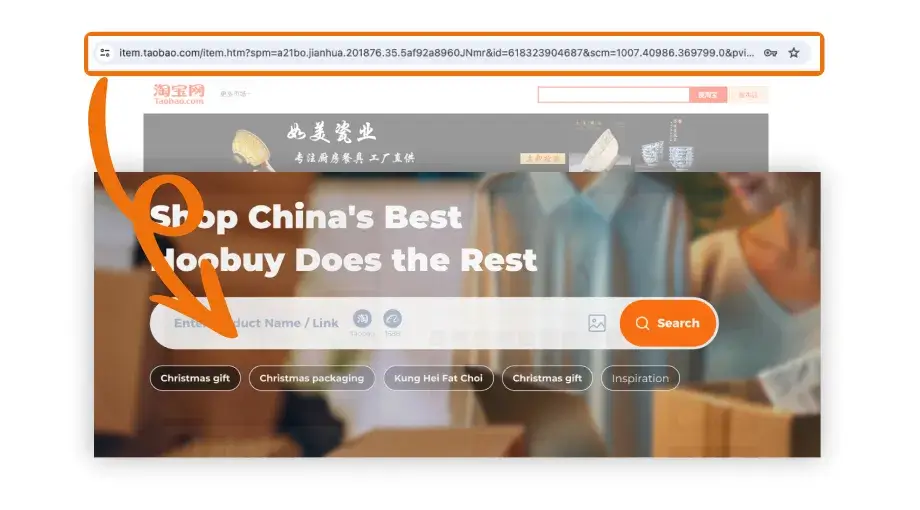
Paste the seller page URL into Hoobuy search, then review the imported item.
Open full-size image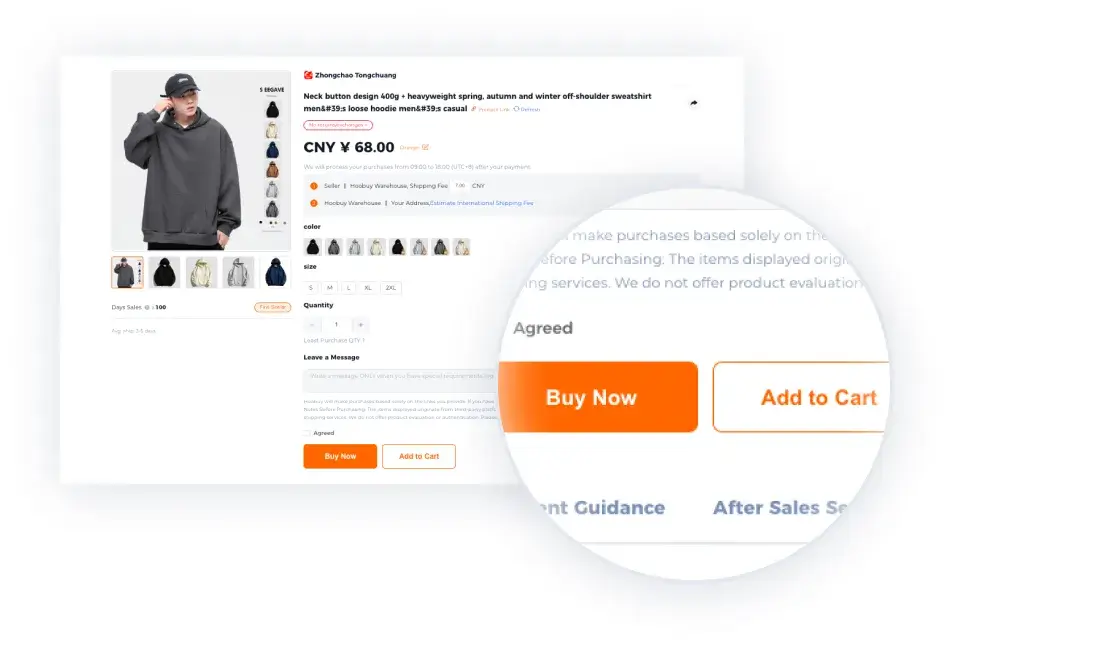
Check colour, size and quantity before choosing Buy Now or Add to Cart.
Open full-size image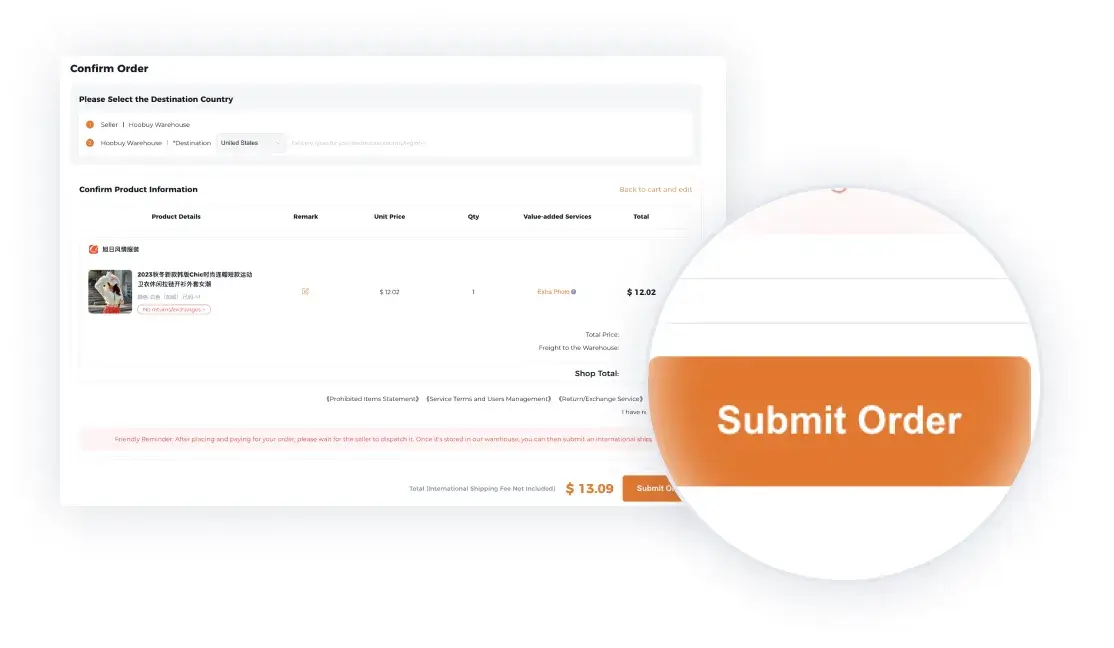
Read the selected item, destination and charges before submitting the purchase.
Open full-size imageOfficial tutorial examples. Sample prices and dates are illustrative; use the details shown in your current order.
What is QC?
QC means quality control. Warehouse photos show the unit received for your order so you can spot a wrong option, missing part or visible damage while the item is still in China.
Check which views are included and what a requested extra view or measurement costs. Standard photos may not show the inside of a bag, a label or a ruler. They cannot establish authenticity or long-term performance.
Check the details that matterHow to check QC photos
In the warehouse area, match the item to its order number, selected colour and size. Check the whole item, labels, accessories and visible damage before you look at finer details.
Request a specific extra photo or measurement when something is unclear. For example, ask for the bag’s interior and strap fastenings if the front view is all you have.
QC can reveal visible mismatches; it is not authentication or a test of long-term performance. “GL” and “RL” are community shorthand for accepting or questioning visible details, not official quality grades.
Returns and exchanges before shipping
Send the order reference and the relevant photo to Hoobuy. Ask whether the seller can exchange or accept a return, what deadline applies, and who pays the postage and service charges.
Keep the disputed item out of a parcel while the issue is open. If you are waiting for another purchase, check the storage deadline on items already received.
Open Hoobuy support Move on to parcel planningHow to choose a trustworthy shopping agent
Check the operator’s identity, current service terms, storage deadlines and parcel claim process. A credible cost comparison includes payment charges and optional services as well as the headline shipping quote. Read how a return, missing item or dispute is handled.
Give each service the same item link, destination and required inspection. Ask what it can do, what it costs and what happens if it cannot proceed. A practical written answer is more useful than an unqualified promise that every route or product is supported.
Prepare a complete cost comparisonOther shopping agents and service options
Superbuy has an Expert Service path alongside normal product-link ordering for items that ordinary search cannot find. If finding the correct product is your main difficulty, ask what sourcing work that request includes.
CSSBuy describes its arrival check as a general inspection and warns that electronics may not be tested. If your purchase needs a function test, ask for a specific service answer before sending it to a warehouse.
Whichever agent you consider, check destination eligibility separately from purchasing. An agent accepting a buying request does not by itself establish that every shipping route can carry the item.
Read Superbuy’s ordering guide Read CSSBuy’s inspection explanation